
Notice: This feature may not be enabled on your account. Please contact support to gain access to this feature..
Introduction
Sometimes, a theme in a codeframe may be too coarse for analysis purposes. For example, a "Customer Service" theme may not be specific enough for actionable analysis. A broad theme like this may result from the Extract process, or through manual creation.
Similarly, it is common to add an "Other" code to a codeframe only to find later that too many verbatims have been coded as "Other" and the theme needs to be split out.
Manually splitting a code is a time-consuming process requiring the coder to review verbatims and manually recoding them into new themes.
Instead, the "Split Theme" feature in codeit can assist and speed up this process.
Steps Required
To access the "Split Theme" feature, follow these steps:
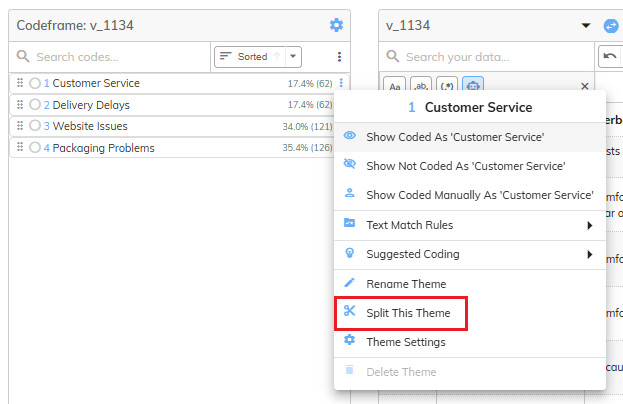
- In the Manual Coding screen, right-click on a theme you want to split:
- Click "Split this theme":
- A dialog will appear showing suggested sub-themes that the theme could be split into:
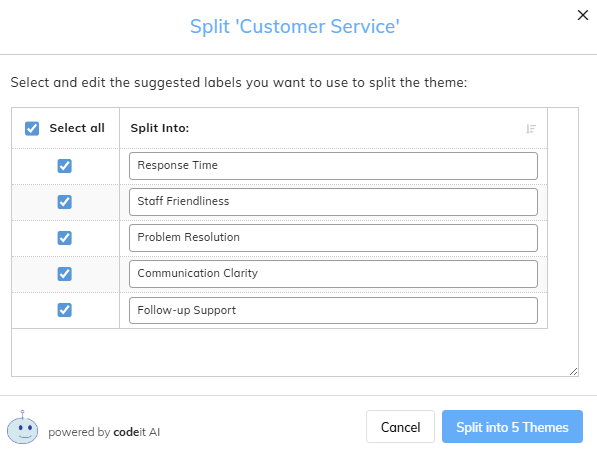
- Use the checkboxes to select the sub-themes you'd like to create and click "Split into...Themes" button
- codeit will create the selected themes and automatically recode verbatims from the original theme into the newly created ones.